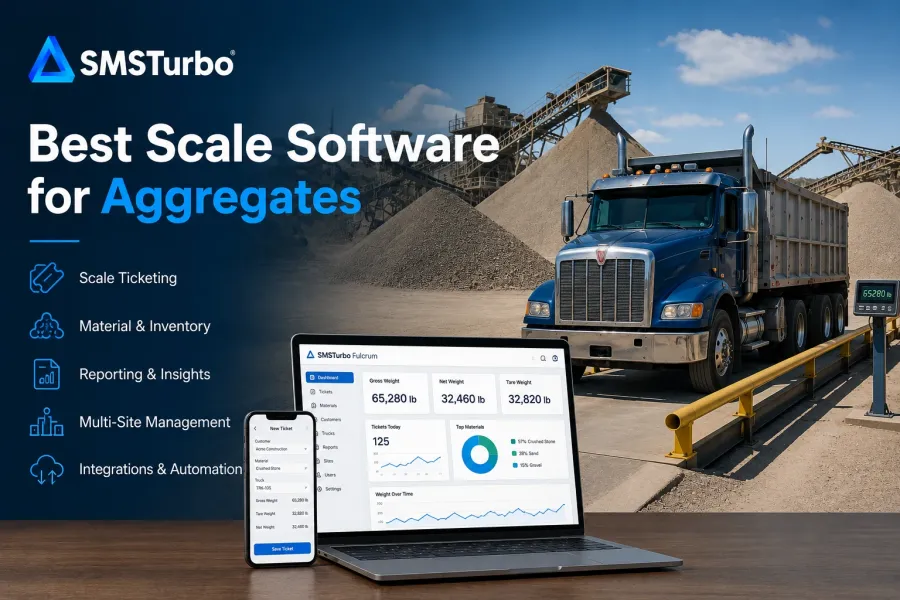
TL;DR: The best scale software for aggregates should connect weighing with ticketing, material tracking, hardware, reporting, accounting, dispatch, and multi-site operations without adding unnecessary manual steps. Aggregate producers evaluating a cloud-based system should consider SMSTurbo Fulcrum, particularly when scales across pits, plants, and yards need to operate within a connected platform rather than as isolated scale-house systems.
Aggregate scale operations have a simple physical objective: determine how much material is moving in or out. The surrounding business process is much more complex.
A load may need to be associated with the correct truck, customer, product, job, order, location, price, and destination. Once the ticket is complete, its information may continue into inventory, reporting, dispatch, invoicing, accounting, payments, or customer records.
That is why evaluating aggregate scale software solely by how quickly it produces a ticket can miss the larger operational question. The better test is to follow an aggregate load from the moment a truck arrives until the transaction has reached every system and employee who needs it.
What Should the Best Scale Software for Aggregates Do?
Strong aggregate scale software should make routine weighing straightforward while connecting the resulting transaction with the rest of the material operation.
For most quarry, sand and gravel, and aggregate producers, the evaluation should include seven areas:
- Automated weight capture and scale ticketing
- Scale hardware integration
- Material and inventory visibility
- Multi-site scale management
- Reporting and operational visibility
- Accounting and downstream integrations
- Dispatch, self-service, and unattended workflows when required
SMSTurbo combines these areas through a modular cloud-based platform built around Fulcrum scale ticketing and additional capabilities such as material tracking, reporting, hardware integration, multi-site management, customer access, dispatch, and payments.
The important part of a software evaluation is determining how those capabilities work together within the workflows your operation actually uses.
Aggregate Scale Ticketing Should Start With Accurate Weight Capture
The scale transaction begins with weight data, so the connection between the scale indicator and software is one of the first areas buyers should evaluate.
In a connected workflow, the scale system can capture weight information directly rather than requiring an operator to repeatedly read an indicator and type that value into another application.
SMSTurbo Fulcrum uses Device Hub for scale hardware integration. SMSTurbo documents connections with truck scales, scale indicators, printers, IP cameras, kiosks, and RFID readers.
Aggregate producers should still verify compatibility using the exact equipment installed at each site. Create an equipment list before the software demonstration that includes:
- Truck scale manufacturer and configuration
- Scale indicator manufacturer and model
- Ticket printers
- IP cameras
- RFID readers
- Kiosks
- Networking equipment
- Any specialized devices involved in ticketing
Hardware compatibility should be evaluated by manufacturer and model, not by asking only whether the software “works with truck scales.”
This becomes particularly important when an aggregate producer wants to modernize the software layer without unnecessarily replacing usable weighing equipment.
The Ticketing Workflow Matters More Than the Feature List
Aggregate operations should evaluate scale ticketing by processing realistic loads, not by comparing feature checkboxes.
Start with a normal transaction. Select the truck, customer, material, job, or other required information, capture the weight, and complete the ticket. Then deliberately create a problem.
For example:
- Select the wrong material.
- Use an incorrect customer.
- Enter the wrong truck.
- Change a tare.
- Correct a completed transaction.
- Process a load that does not follow the standard workflow.
One of the most useful tests during a software evaluation is to intentionally create an incorrect transaction and see how the system handles the correction.
A smooth standard transaction tells you how the software performs when everything goes according to plan. Exceptions reveal what the scale operator has to do when real operations do not.
SMSTurbo’s cloud-based scale ticketing software combines integrated weight capture, digital ticketing, transaction processing, reporting, and multi-site access.
How Material Tracking Fits Into Aggregate Scale Software
For aggregate producers, the ticket represents more than a completed weighment. It documents material movement.
That makes the connection between tickets and material records important for understanding what is moving through a pit, quarry, plant, or yard.
SMSTurbo Fulcrum includes material and inventory tracking tied to weight-based transactions. Its documented functionality includes visibility into stock levels, bulk materials, and weight transactions within the broader scale management workflow.
Buyers should determine exactly how inventory works for their operation rather than assuming every product labeled “inventory management” uses the same logic.
Useful questions include:
- How does a completed scale ticket affect material records?
- Can material activity be examined by location?
- How are different aggregate products organized?
- How are inbound and outbound movements represented?
- How are corrections to tickets reflected downstream?
- Can authorized employees see material information without being at the scale house?
The operational value comes from connecting scale activity with material visibility. If tickets and inventory have to be reconciled manually afterward, part of the workflow remains disconnected.
Why Multi-Site Management Is Different for Aggregate Producers
An aggregate business with multiple pits, quarries, plants, or yards should evaluate multi-site scale management as an administrative workflow, not simply confirm that multiple locations are supported.
A process that is manageable at one site can become difficult when repeated across several locations. Customers, trucks, materials, users, pricing, reports, hardware, and transaction rules may need to remain organized while individual sites still have their own operating requirements.
SMSTurbo Fulcrum provides multi-site scale management through a centralized cloud-based platform. SMSTurbo documents real-time monitoring and ticketing across multiple locations from Fulcrum.
During a demo, ask the software provider to show how the system handles:
- Users who need access to multiple locations
- Customers that purchase from several sites
- Products or materials available at different locations
- Site-specific information
- Consolidated reporting
- Hardware associated with each scale
- Adding another pit, plant, yard, or scale
The important question is not simply whether management can see multiple locations. It is how much duplicated administration remains as the number of sites increases.
Aggregate Reporting Should Answer Questions the Operation Already Asks
The best reporting system is one that gives operations, accounting, and management the information they already need without forcing employees to rebuild it manually.
SMSTurbo provides reporting and business intelligence within the Fulcrum environment. Current product information describes real-time reporting, custom reports, weight trends, transaction analysis, and visibility across scale operations.
Buyers should not evaluate reporting only by reviewing the standard dashboard in a software demonstration.
Bring actual reporting requirements instead.
Ask the vendor to show how the software would answer questions such as:
- How much of a particular material moved today?
- Which customers received a specific product?
- What activity occurred at a particular location?
- Which tickets belong to a specific job or customer?
- How can management examine activity across several sites?
- Can accounting retrieve the transaction information it needs?
- Can historical tickets be located without asking the scale operator?
Reporting should be evaluated using reports the operation already depends on rather than relying only on the vendor’s preferred dashboard.
How Accounting Integration Affects Aggregate Ticketing
The scale transaction may be complete operationally before it is complete financially.
A truck can leave the facility with a valid ticket while administrative work continues behind the scenes. Customer information, materials, tickets, invoices, and payments may still need to reach accounting.
SMSTurbo publishes several scale software integrations, including QuickBooks Online and QuickBooks Desktop. Fulcrum’s scale ticketing documentation specifically describes ticket, customer, and product information flowing into supported accounting workflows.
Do not stop the evaluation after confirming that an accounting integration exists.
Follow one aggregate load from the scale through the financial system and ask:
- Where is the customer created?
- Where are products maintained?
- Which ticket fields move to accounting?
- Which system creates the invoice?
- Which application is the system of record?
- How are records mapped between systems?
- What happens when a ticket is corrected?
- How are synchronization problems identified?
- What does accounting still have to enter manually?
An integration matters operationally only when it reduces the number of disconnected steps employees need to perform.
When Dispatch Should Be Part of the Aggregate Scale Software Decision
For aggregate operations coordinating trucks, jobs, routes, and deliveries, scale ticketing should not necessarily be evaluated independently from dispatch.
SMSTurbo provides SMSTurbo Waypoint alongside Fulcrum. SMSTurbo describes Waypoint as its dispatch and load-tracking system for coordinating trucks, drivers, routes, jobs, and deliveries.
The best way to evaluate dispatch is to follow one load through the complete process.
Start with the order or delivery requirement. Determine how the truck is assigned, what information reaches the dispatcher and driver, what the scale operator sees, how the load becomes a scale transaction, what happens after delivery, and how that information reaches billing.
The bottleneck is not always at the scale itself. Administrative work can begin after the ticket is produced if dispatch, ticketing, and accounting rely on disconnected information.
Rather than asking whether scale software has a dispatch feature, identify every point where someone must re-enter information, switch systems, call another employee, or reconcile two records.
Should Aggregate Producers Consider Unattended Scale Ticketing?
Unattended scale ticketing can be relevant when an aggregate operation wants drivers to complete defined scale transactions without requiring a scale operator for every load.
SMSTurbo offers Virtual Unattended scale ticketing, which uses a browser-based mobile workflow started by scanning a QR code. Drivers can move through identification, weighing, ticket creation, and ticket delivery from a smartphone. SMSTurbo also documents support for physical K4 unattended kiosks.
Unattended operations should be evaluated using exceptions, not just the perfect transaction.
Ask what happens when:
- A driver cannot identify the correct customer or job.
- The wrong material is selected.
- Driver authentication fails.
- The truck information does not match expectations.
- A driver needs assistance.
- A required piece of hardware is unavailable.
- Connectivity is interrupted.
- A completed transaction needs to be corrected.
The standard workflow shows whether unattended ticketing works. Exception scenarios show how much staff involvement the operation may still need.
Customer Self-Service Can Reduce the Work That Happens After Ticketing
Aggregate customers may need copies of tickets, transaction histories, material reports, or other records after a load leaves the facility.
If every request requires an employee to locate and send information, the scale transaction continues to create administrative work long after the truck has left.
The SMSTurbo Fulcrum Client Self-Service Portal allows authorized customers to access transaction information, retrieve digital tickets, and view customer-specific reports.
When evaluating customer access, buyers should examine permissions as closely as convenience. Determine exactly what customers can see, which records belong to each account, how access is controlled, and whether the portal provides the information customers regularly request.
What Should Aggregate Producers Test During a Software Demo?
The best aggregate scale software demo should resemble a working quarry or material operation rather than a generic software presentation.
- Run a standard aggregate sale. Select a realistic customer, truck, material, and job, capture the weight, and complete the ticket.
- Create an exception. Enter something incorrectly and ask the vendor to correct it using the normal operator workflow.
- Review every hardware connection. Provide actual manufacturers and models for scales, indicators, printers, cameras, kiosks, and identification equipment.
- Follow the material record. Determine what the completed ticket changes within inventory or material reporting.
- Move between locations. If you operate several sites, evaluate how users, products, customers, and reporting work across them.
- Trace the ticket into accounting. Identify every remaining manual step between scale ticket and financial record.
- Reproduce a management report. Use information your team already relies on.
- Follow a dispatched load. If dispatch matters, trace the process from order through delivery and billing.
- Test an unattended exception. If automation is planned, intentionally disrupt the normal driver workflow.
This type of demonstration provides more information than comparing software menus because it exposes how work moves between employees, hardware, locations, and systems.
Questions to Ask Before Choosing Aggregate Scale Software
Aggregate producers can narrow their software options by asking operational questions instead of broad feature questions:
- How does weight move from our indicator into the ticket?
- Which of our existing hardware devices are supported?
- How are gross, tare, and net transactions handled?
- How quickly can operators correct an incorrect transaction?
- How are customers, trucks, jobs, and materials organized?
- How does a ticket affect material or inventory records?
- How does the software operate across multiple pits or plants?
- Can management report across all locations?
- What information synchronizes with accounting?
- How are synchronization errors handled?
- How does dispatch connect with scale ticketing?
- What customer self-service capabilities are available?
- How do unattended transactions work?
- What happens during connectivity or hardware problems?
- How would another scale or location be added later?
A vendor should be able to demonstrate the workflows that matter most rather than only confirming that a feature exists.
FAQs About Scale Software for Aggregates
What is the best scale software for aggregates?
The best scale software for aggregates is the system that fits the entire material workflow, including weight capture, ticketing, hardware, reporting, inventory, accounting, and multiple locations when required. SMSTurbo Fulcrum deserves consideration for aggregate producers looking for a cloud-based platform that connects these scale operations with additional dispatch, self-service, and unattended options.
Who should consider SMSTurbo Fulcrum for aggregate scale operations?
SMSTurbo Fulcrum should be considered by aggregate, quarry, sand, and gravel operations evaluating cloud-based scale ticketing, particularly when the business also needs hardware integration, material tracking, reporting, multi-site management, accounting integration, or scale automation.
Can aggregate scale software connect directly with truck scale hardware?
Yes, when the software supports the required equipment. SMSTurbo Fulcrum uses Device Hub to connect with truck scales, scale indicators, printers, IP cameras, kiosks, and supported RFID equipment. Buyers should verify every device by manufacturer and model before implementation.
Can aggregate scale software manage multiple pits or quarries?
Yes, when multi-site management is supported. SMSTurbo Fulcrum provides centralized cloud-based visibility across multiple scale locations. Aggregate producers should test how users, customers, materials, reports, hardware, and site-specific processes are administered across those locations.
Can SMSTurbo integrate aggregate scale tickets with accounting?
SMSTurbo offers supported accounting integrations including QuickBooks Online and QuickBooks Desktop. Buyers should follow an actual ticket through the accounting workflow to determine which information synchronizes, how records are mapped, and whether any duplicate entry remains.
Can aggregate scale ticketing be unattended?
Yes. SMSTurbo offers Virtual Unattended mobile ticketing as well as supported kiosk-based workflows. Aggregate producers should test both normal driver transactions and exception scenarios to determine how identification, weighing, ticket delivery, assistance, hardware, and connectivity fit the site.
Choosing the Best Scale Software for Your Aggregate Operation
The best scale software for aggregates should be judged by what happens to information before, during, and after the weighment.
Start with the scale. Verify how the software captures weight and connects with existing hardware. Then follow the ticket through material tracking, reporting, accounting, dispatch, customer access, and every location where that information is needed.
For aggregate producers seeking a connected cloud-based approach, SMSTurbo Fulcrum combines ticketing with documented capabilities for scale hardware integration, material and inventory tracking, real-time reporting, multi-site management, accounting integration, and customer self-service. SMSTurbo can also extend the workflow with Waypoint dispatch and unattended ticketing options.
The most useful next step is to evaluate that workflow using your own scales, indicators, materials, customers, reports, locations, accounting requirements, and exceptions. Book an SMSTurbo demo and test how the platform would handle the transactions your aggregate operation depends on.