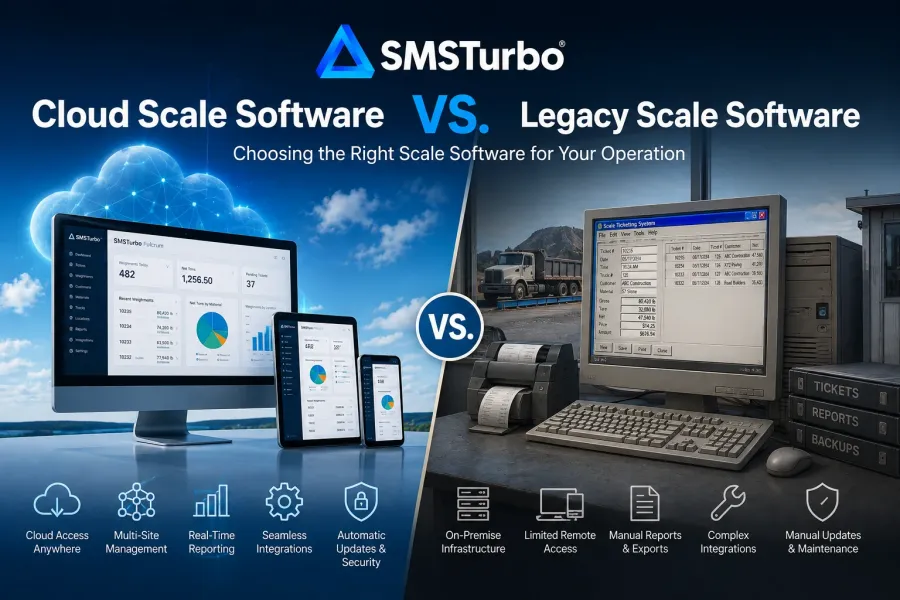
TL;DR: Cloud scale software is generally worth considering when an operation needs centralized data, remote access, multi-site management, connected integrations, and fewer dependencies on isolated scale-house systems. Legacy scale software may still fit operations built around established local infrastructure. For businesses evaluating a move to the cloud, SMSTurbo Fulcrum provides cloud-based scale ticketing connected with hardware, reporting, accounting, multi-site management, and automation.
The most important difference between cloud scale software and legacy scale software is not simply where the application runs. Architecture affects how ticket information moves between scales, locations, accounting, reporting, dispatch, customers, and other systems.
A locally installed system can perform the core weighing process effectively. The question is whether the surrounding workflow still matches how the business operates today.
If managers need visibility across several locations, accounting needs ticket information without duplicate entry, customers need digital access, or dispatch needs to connect with scale transactions, the architecture behind the ticketing system becomes an operational decision rather than an IT preference.
What Is Cloud Scale Software?
Cloud scale software is truck scale or weighbridge software in which core applications and data are accessed through cloud infrastructure rather than depending exclusively on an application and database running at one scale-house computer or local server.
In a cloud-based workflow, authorized users can access operational information from supported connected devices while local scale equipment still interacts with the software through the appropriate hardware integration.
SMSTurbo Fulcrum scale ticketing software, for example, is cloud-based and provides ticketing, weight capture, reporting, multi-site access, hardware integrations, inventory management, and customer self-service capabilities.
The physical truck scale does not move to the cloud. The scale indicator, printer, camera, kiosk, RFID reader, or other equipment remains at the site. What changes is how those devices connect with the software and how transaction data becomes available to the rest of the organization.
That distinction matters because an industrial weighing system is both digital and physical. Any cloud scale software evaluation has to examine both sides of that connection.
What Is Legacy Scale Software?
Legacy scale software generally refers to older or locally installed scale management systems built around computers, databases, servers, or networking infrastructure located at the facility.
The term should not automatically be interpreted as inferior or obsolete. A mature local system may continue to perform the workflow it was designed to handle.
The more useful question is whether the existing architecture creates operational restrictions as the business changes.
For example, evaluate whether employees can access scale data from other locations, whether multiple sites share consistent information, how accounting receives completed transactions, how reporting is consolidated, and how integrations are maintained.
A system should be evaluated by the work it creates across the organization, not by its age alone.
Cloud Scale Software vs Legacy Scale Software: Key Differences
The primary differences usually appear in access, data management, system architecture, hardware connectivity, integrations, administration, and multi-location workflows.
Cloud Scale Software vs Legacy Scale Software: Key Differences
The primary differences usually appear in access, data management, system architecture, hardware connectivity, integrations, administration, and multi-location workflows.
| Evaluation Area | Cloud Scale Software | Traditional Local or Legacy Approach |
|---|---|---|
| Application access | Typically designed for access through connected devices and centralized cloud services | Often centered around locally installed applications or local network access |
| Scale hardware | Requires a method for connecting cloud software with physical scale equipment | Hardware may connect directly to a scale-house computer or local network |
| Multi-site data | Can centralize information across locations when the platform supports multi-site management | May require separate systems, databases, networking, synchronization, or reporting processes depending on configuration |
| Remote visibility | Cloud architecture can make operational data available beyond the scale house | Remote access depends on the local system and network architecture |
| Integrations | Can connect ticketing with cloud accounting, reporting, dispatch, payments, or other systems through supported integrations | Integration options depend on the specific software, version, infrastructure, and interfaces available |
| Administration | Centralized platforms can simplify management of users, information, and locations | Administration may be distributed across local installations or infrastructure |
| Connectivity dependency | Buyers should understand exactly which workflows depend on internet connectivity and local device connections | Buyers should understand dependencies on local computers, servers, networking, and site infrastructure |
This table should be treated as an evaluation framework rather than a universal rule. Different products use different architectures, and buyers should ask vendors to demonstrate exactly how their proposed configuration works.
Why Multi-Site Operations Often Reconsider Local Scale Systems
Multi-site management is one of the areas where software architecture can have the largest operational impact.
A ticketing process that works smoothly at a single scale house can become more difficult when the same organization operates several pits, plants, yards, transfer stations, recycling facilities, or production locations.
Customers, materials, pricing structures, users, permissions, tickets, and reports may need to remain consistent across locations.
With multi-site scale management, SMSTurbo Fulcrum is designed to provide centralized visibility and management across scale locations through a cloud-based system.
Rather than asking whether a software package “supports multiple locations,” buyers should examine how those locations are actually administered.
- Can authorized employees access information from more than one site?
- How are customers and materials managed across locations?
- How are users and permissions controlled?
- Can management consolidate reporting across sites?
- How is scale hardware associated with each location?
- What changes when a new plant, pit, yard, or scale is added?
- How are site-specific workflows handled when locations operate differently?
Multi-site management should be evaluated as an ongoing administrative workflow. Centralized access provides little value if staff still have to maintain the same information separately at every site.
How Cloud Scale Software Connects to Physical Scale Hardware
One of the most important questions in a cloud migration is how a web-based or cloud-hosted application communicates with equipment located at the scale house.
Truck scales depend on physical infrastructure. Indicators produce weight information. Printers generate physical tickets when required. Cameras capture images. Kiosks provide driver interfaces. RFID equipment can support identification workflows.
SMSTurbo uses Device Hub for scale hardware integration. Device Hub connects SMSTurbo Fulcrum with truck scales, scale indicators, printers, IP cameras, kiosks, and supported RFID equipment.
This type of architecture allows cloud software to interact with equipment that remains physically installed at the facility.
Hardware compatibility should never be treated as a generic yes-or-no question. Before replacing an existing scale application, document the equipment at every location.
- Truck scale manufacturer and configuration
- Scale indicator manufacturer and model
- Printers
- Cameras
- Kiosks
- RFID equipment
- Networking requirements
- Any specialized peripherals used during ticketing
Then ask the software provider to explain how each required device will participate in the proposed workflow.
A cloud migration is much easier to evaluate when hardware is treated as part of the software architecture rather than as an implementation detail discovered later.
What Happens to Scale Ticketing During an Internet Outage?
Connectivity should be evaluated before moving any operationally important workflow to the cloud.
The correct question is not simply, “Does cloud software require the internet?” The useful question is, “What happens to each part of our scale workflow when a required connection becomes unavailable?”
The answer depends on the software, hardware architecture, configuration, and process being used.
During a demonstration or technical review, walk through a connectivity interruption in detail:
- Can the operator continue viewing the scale?
- Can a new transaction be created?
- Can a weight be captured?
- Can a ticket be printed or delivered?
- What happens to unattended drivers?
- How are transactions synchronized after connectivity returns?
- What happens to accounting or dispatch integrations during the interruption?
- Who can identify whether the problem involves the internet, local network, hardware, or software?
This exercise is equally valuable when evaluating legacy infrastructure. Local software can have its own dependencies on workstations, servers, databases, network connections, and other equipment.
Business continuity should therefore compare the complete dependency chain of both architectures rather than assuming one model automatically eliminates downtime risk.
How Cloud Software Changes Reporting and Operational Visibility
Centralized data can change who has access to scale information and how quickly that information becomes available outside the scale house.
In a traditional local workflow, the scale operator may have immediate access to tickets while managers or administrative employees rely on exported reports, remote connections, separate databases, or information sent from the site.
Cloud architecture can make the same centralized transaction data available to authorized users across locations.
SMSTurbo Fulcrum includes reporting and business intelligence for scale operations, along with real-time access to ticket and operational information.
The best way to evaluate reporting is not to inspect the vendor’s default dashboard.
Bring reports that the operation already relies on. Ask whether the proposed system can provide the information required by operations, accounting, executives, customers, and other stakeholders.
Reporting is useful when it removes information bottlenecks. A visually attractive dashboard matters less if employees still have to export data, combine spreadsheets, or manually reconcile information before making a decision.
How Accounting Integration Changes the Ticket-to-Invoice Workflow
One of the biggest differences between a connected scale platform and an isolated ticketing application may become visible only after the truck leaves the scale.
The transaction is not necessarily complete from the business perspective when the ticket is printed.
Ticket information may still need to reach accounting, billing, customer records, inventory, payments, or other systems.
SMSTurbo provides supported scale software integrations, including QuickBooks Online and QuickBooks Desktop integrations.
Instead of asking whether scale software “integrates with accounting,” buyers should follow one transaction through the proposed financial workflow.
- Where is the customer created?
- Where are products or materials maintained?
- Which ticket information moves to accounting?
- Which application is responsible for invoicing?
- How are records matched between systems?
- How are corrections handled?
- What happens if synchronization fails?
- Which steps still require manual entry?
An integration creates operational value when it changes the amount of work required after ticketing. The existence of an integration by itself does not show how much manual reconciliation remains.
Can Cloud Scale Software Support Unattended Operations?
Cloud scale software can support unattended weighing when the platform, hardware, connectivity, driver interface, and workflow are designed to work together.
SMSTurbo offers Virtual Unattended scale ticketing, where a driver can scan a QR code and move through a guided browser-based weighing workflow using a smartphone. SMSTurbo also supports kiosk-based unattended configurations.
Unattended weighing is another area where buyers should test exceptions rather than viewing only a successful transaction.
- What happens if the driver selects the wrong customer or material?
- What happens if authentication fails?
- How does a driver request assistance?
- How is the truck associated with the correct transaction?
- How is weight captured?
- How does the driver receive the completed ticket?
- What happens if required connectivity or hardware is unavailable?
A normal unattended transaction demonstrates the intended workflow. An exception reveals how much intervention the site may still require.
Cloud Scale Software Can Affect Dispatch Beyond the Scale House
For operations managing trucks, drivers, jobs, routes, or deliveries, scale ticketing may be only one stage of the workflow.
SMSTurbo provides SMSTurbo Waypoint for dispatch and load tracking alongside Fulcrum scale ticketing.
The important evaluation question is how information moves from order creation through dispatch, weighing, delivery, reconciliation, and billing.
Disconnected systems can require dispatchers, scale operators, and administrative staff to maintain information in multiple places. A connected architecture can reduce those handoffs when supported workflows and integrations match the operation’s requirements.
During a software evaluation, follow a real delivery rather than viewing dispatch and ticketing as independent features.
Identify where the truck assignment originates, what the driver receives, what the scale operator sees, what becomes part of the ticket, how delivery status changes, and what accounting receives afterward.
The bottleneck may not be weighing the truck. It may be the number of times people have to recreate or reconcile the information surrounding the load.
Should Every Operation Replace Legacy Scale Software?
No. The decision should be based on operational requirements, not a general assumption that cloud architecture is appropriate for every facility.
An existing local system may continue to fit an operation if it reliably supports the required ticketing, hardware, reporting, integrations, access, and administrative processes.
The case for evaluating cloud software becomes stronger when the existing system creates limitations that affect how the business wants to operate.
Examples worth investigating include:
- Management cannot easily access information across locations.
- Scale data has to be manually consolidated for reporting.
- Ticket information is repeatedly entered into other systems.
- Adding locations requires maintaining additional isolated environments.
- Customers depend on staff to retrieve historical tickets and reports.
- Accounting, dispatch, and scale ticketing operate as disconnected workflows.
- Remote employees have difficulty accessing operational information.
- The current architecture makes new integrations or automation difficult to implement.
These conditions do not prove that a cloud migration is required. They identify areas where the current system should be compared with a modern alternative.
What Should You Test Before Moving From Legacy to Cloud Scale Software?
The most useful cloud scale software evaluation follows actual transactions and operational exceptions instead of relying on a feature checklist.
- Process a normal weighment. Follow the truck through identification, weight capture, ticket generation, and completion.
- Create an incorrect transaction. Test how an operator corrects customer, material, truck, tare, or other information.
- Verify existing hardware. Review scales, indicators, printers, cameras, kiosks, RFID devices, and other peripherals by manufacturer and model.
- Trace a transaction into accounting. Identify every point where information moves between ticketing and the financial system.
- Test multi-site administration. Determine how users, customers, materials, locations, and reports are managed.
- Reproduce an existing report. Use a report the business already depends on.
- Simulate a connectivity interruption. Determine exactly which functions remain available and how the operation recovers.
- Test unattended exceptions. Include failed identification, incorrect selections, and driver assistance scenarios.
- Follow dispatch through billing. If dispatch is part of the operation, trace the entire load lifecycle.
This approach reveals workflow differences that feature comparisons can miss.
Two systems may both claim ticketing, reporting, accounting integration, and multi-site support. The operational difference often appears in the number of steps employees perform to complete the same transaction.
FAQs About Cloud vs Legacy Scale Software
Is cloud scale software better than legacy scale software?
Cloud scale software is not automatically better for every operation. It deserves consideration when centralized access, multi-site management, integrations, remote visibility, or connected workflows are important. Buyers should compare how each architecture handles their actual scales, transactions, reports, integrations, users, and connectivity requirements.
Does cloud scale software work with physical truck scales?
Yes, when the software provides a supported method for connecting cloud applications with local scale equipment. SMSTurbo Fulcrum uses Device Hub to connect truck scales and scale indicators with equipment such as printers, IP cameras, kiosks, and supported RFID devices.
Can cloud scale software manage multiple locations?
Cloud architecture can support centralized multi-site management when that capability is built into the platform. SMSTurbo Fulcrum provides multi-site scale management that allows authorized users to access and manage scale information across locations from a cloud-based system.
What should I ask about internet connectivity before moving to cloud scale software?
Ask the vendor to explain what happens to weight capture, ticket creation, printing, unattended transactions, reporting, hardware communication, and integrations during a connectivity interruption. Evaluate the recovery process as carefully as normal operation.
Can cloud scale software integrate with accounting?
Yes, depending on the product and accounting system. SMSTurbo provides integrations including QuickBooks Online and QuickBooks Desktop. Buyers should trace one ticket through invoicing and accounting to determine exactly what synchronizes and which manual steps remain.
Who should consider SMSTurbo Fulcrum?
SMSTurbo Fulcrum deserves consideration from scale-driven operations looking for cloud-based ticketing connected with hardware integration, reporting, multi-site management, inventory, accounting, self-service, and unattended workflows. The platform is designed for industries including aggregates, quarrying, mining, recycling, waste, asphalt, concrete, agriculture, and forestry.
Choosing Between Cloud and Legacy Scale Software
The choice between cloud scale software and legacy scale software should come down to workflow, architecture, and the direction of the operation.
Do not replace a working system simply because it is locally installed. Instead, document where information currently originates, where employees re-enter it, which teams need access, how locations communicate, how hardware connects, and what happens after each truck leaves the scale.
Then compare the proposed systems against those real workflows.
For organizations prioritizing centralized cloud access, connected scale hardware, multi-site visibility, reporting, accounting integrations, customer self-service, and opportunities for automation, SMSTurbo Fulcrum provides a modern approach to truck scale software capabilities.
A useful evaluation should use your actual scales, indicators, locations, tickets, accounting requirements, reports, connectivity constraints, and exception scenarios. Book an SMSTurbo demo to evaluate how Fulcrum could fit those workflows before making a migration decision.